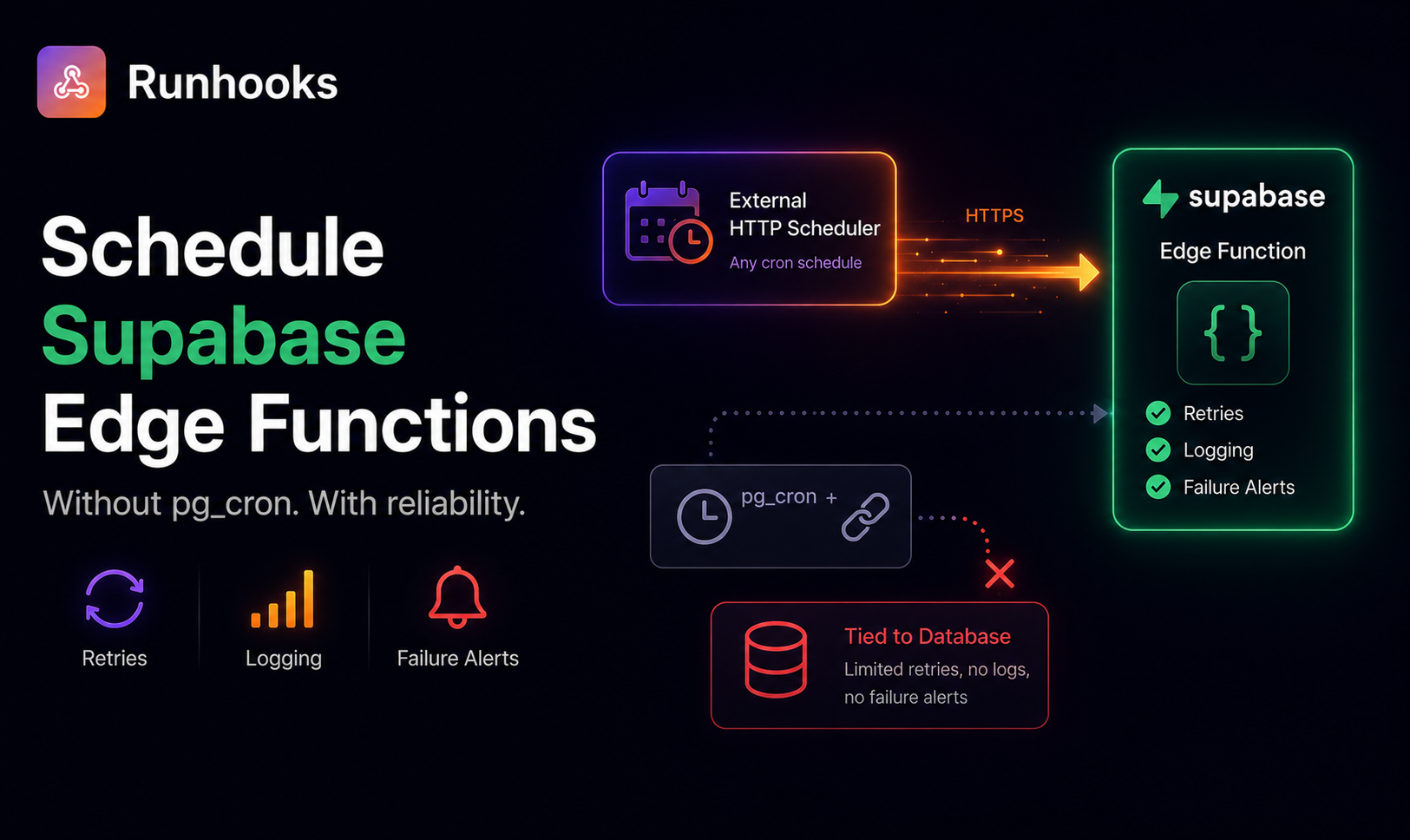
A note from the founder. Need to schedule Supabase Edge Functions without wrestling with pg_cron SQL? I'm looking for a small group of early users to try Runhooks and share honest feedback. Early adopters get upgraded plans for free.
Supabase Edge Functions are HTTP endpoints running on Deno Deploy. You write TypeScript, deploy with the Supabase CLI, and get a URL you can call from anywhere. The natural next question is: how do I call this function on a schedule?
Supabase's official answer is pg_cron + pg_net — two Postgres extensions that let you schedule an HTTP request from inside the database. It works, but it comes with trade-offs that aren't obvious until your scheduled job silently stops running. There's a simpler approach: call the Edge Function URL directly from an external HTTP scheduler, the same way you'd call any API endpoint.
How pg_cron + pg_net Works
Supabase's documentation recommends combining two Postgres extensions to schedule Edge Functions:
- pg_cron — a cron scheduler that runs inside Postgres. You register a SQL statement with a cron expression, and the database executes it on schedule.
- pg_net — an HTTP client extension for Postgres. It lets you make HTTP requests from SQL.
The combination looks like this:
-- Enable the extensions (via Supabase dashboard or SQL)
CREATE EXTENSION IF NOT EXISTS pg_cron;
CREATE EXTENSION IF NOT EXISTS pg_net;

-- Store your anon key in Vault for security
SELECT vault.create_secret(
  'eyJhbGciOiJIUzI1NiIsInR5cCI6IkpXVCJ9...',
  'supabase_anon_key'
);

-- Schedule the Edge Function to run every hour
SELECT cron.schedule(
  'hourly-sync',
  '0 * * * *',
  $
  SELECT net.http_post(
    url := 'https://your-project.supabase.co/functions/v1/sync',
    headers := jsonb_build_object(
      'Content-Type', 'application/json',
      'Authorization', 'Bearer ' || (
        SELECT decrypted_secret
        FROM vault.decrypted_secrets
        WHERE name = 'supabase_anon_key'
      )
    ),
    body := '{"source": "pg_cron"}'::jsonb
  );
  $
);
pg_cron fires the SQL statement on schedule, pg_net sends the HTTP request, and your Edge Function executes. It's clever — the database becomes its own scheduler.
But this design has structural problems.
The Limitations of pg_cron for Edge Functions
Your schedule is coupled to the database. pg_cron runs inside Postgres. If the database restarts, is under heavy load, or pauses (free-tier projects pause after 7 days of inactivity), every scheduled job stops. There's no external watchdog — when the database is down, the scheduler is down.
No retries on failure. If your Edge Function returns a 500 error or times out, pg_cron doesn't retry. The failed invocation is gone. The next attempt happens at the next scheduled tick — which could be an hour or a day later depending on your cron expression.
No execution logs outside the database. pg_net stores HTTP responses in the net._http_response table, but these records are inside the same database that might be paused or unavailable. There's no external dashboard showing you which runs succeeded, which failed, and why. Debugging requires writing SQL queries against internal tables.
Limited alerting. If your Edge Function starts failing consistently, pg_cron won't notify you. You discover the problem when your users report stale data or when you manually check the _http_response table.
Cron expressions only — no timezone support. pg_cron uses UTC exclusively. If you want a job to run at 9 AM in America/New_York, you need to calculate the UTC offset yourself and update it after every DST transition.
SQL overhead for HTTP tasks. Scheduling an HTTP call shouldn't require writing SQL, managing Vault secrets, and enabling Postgres extensions. If your task is "call this URL every hour," the database is an unnecessary intermediary.
The External Scheduler Approach
Your Edge Functions are HTTP endpoints. They have a URL, they accept headers, and they return standard HTTP responses. Any service that can send an HTTP request on a cron schedule can trigger them — no database involvement required.
The external scheduler approach:
- Your Edge Function is deployed and has a public URL
- An external service calls that URL on a schedule you define
- The Edge Function runs, does its work, and returns a response
- The scheduler logs the result, retries on failure, and alerts you on persistent errors
This decouples the schedule from the database entirely. Your Edge Function runs whether the database is awake, paused, under load, or being migrated. The scheduler operates independently.
Building a Scheduled Edge Function
Here's a practical example: an Edge Function that syncs data from an external API into your Supabase database.
Step 1: Write the Edge Function
// supabase/functions/sync-products/index.ts
import { createClient } from 'https://esm.sh/@supabase/supabase-js@2';

Deno.serve(async (req) => {
  // Verify the request is authorized
  const authHeader = req.headers.get('Authorization');
  if (!authHeader?.startsWith('Bearer ')) {
    return new Response(
      JSON.stringify({ error: 'Missing authorization header' }),
      { status: 401, headers: { 'Content-Type': 'application/json' } },
    );
  }

  const supabase = createClient(
    Deno.env.get('SUPABASE_URL')!,
    Deno.env.get('SUPABASE_SERVICE_ROLE_KEY')!,
  );

  // Fetch products from external API
  const response = await fetch('https://api.example.com/products', {
    headers: { 'X-API-Key': Deno.env.get('EXTERNAL_API_KEY')! },
  });

  if (!response.ok) {
    return new Response(
      JSON.stringify({ error: 'Upstream API failed', status: response.status }),
      { status: 502, headers: { 'Content-Type': 'application/json' } },
    );
  }

  const products = await response.json();

  // Upsert into Supabase
  const { data, error } = await supabase
    .from('products')
    .upsert(products, { onConflict: 'external_id' });

  if (error) {
    return new Response(
      JSON.stringify({ error: error.message }),
      { status: 500, headers: { 'Content-Type': 'application/json' } },
    );
  }

  return new Response(
    JSON.stringify({
      synced: products.length,
      timestamp: new Date().toISOString(),
    }),
    { status: 200, headers: { 'Content-Type': 'application/json' } },
  );
});
Step 2: Deploy the function
supabase functions deploy sync-products
Your function is now available at:
https://<your-project-ref>.supabase.co/functions/v1/sync-products
Step 3: Schedule it with Runhooks
- Create a job in Runhooks — "Product sync"
- Set the URL —
https://your-project.supabase.co/functions/v1/sync-products - Set the method —
POST - Set the schedule —
0 */2 * * *(every 2 hours) - Set the timezone — your business timezone
- Add a header —
Authorization: Bearer <your-supabase-anon-key> - Enable retries — 3 attempts with exponential backoff
Every 2 hours, Runhooks sends an HTTP POST to your Edge Function. The function syncs products and returns a JSON response. Runhooks logs the HTTP status, response body ({ synced: 142, timestamp: "..." }), and duration. If the function returns a 5xx error, Runhooks retries within seconds. If it fails consistently, you get an alert.
Securing Edge Functions for External Calls
When an external service calls your Edge Functions, you need to verify the caller is legitimate. Supabase provides two keys you can use:
Anon key — for functions that respect Row Level Security (RLS). The caller gets the same access as an anonymous user. Use this when the Edge Function only reads public data or operates within RLS policies.
Service role key — bypasses RLS entirely. Use this when the Edge Function needs admin-level access (bulk upserts, cross-user queries, schema modifications).
The authorization check inside your function is straightforward:
const authHeader = req.headers.get('Authorization');
const token = authHeader?.replace('Bearer ', '');

// Option A: verify it matches the expected key
if (token !== Deno.env.get('EXPECTED_CRON_KEY')) {
  return new Response('Unauthorized', { status: 401 });
}

// Option B: use Supabase client to verify the JWT
const supabase = createClient(
  Deno.env.get('SUPABASE_URL')!,
  Deno.env.get('SUPABASE_ANON_KEY')!,
);
const { data: { user }, error } = await supabase.auth.getUser(token);
For scheduled jobs triggered by an external scheduler, Option A (shared secret) is the simplest and most common approach. Store the secret as an environment variable in your Supabase project and configure the same value in your scheduler's request headers.
pg_cron vs. External Scheduler: When to Use Which
pg_cron isn't inherently bad — it's a good tool applied to the wrong problem when used for HTTP calls. Here's when each approach makes sense:
Use pg_cron for:
- Database maintenance —
VACUUM,ANALYZE, index rebuilds - Data cleanup —
DELETE FROM sessions WHERE expires_at < now() - Materialized view refreshes —
REFRESH MATERIALIZED VIEW CONCURRENTLY daily_stats - Partition management — creating or dropping time-based table partitions
These tasks run entirely inside Postgres and don't need HTTP, retries, or external logging.
Use an external scheduler for:
- Edge Functions — any function you'd trigger via HTTP
- External API calls — syncing data from third-party services
- Cross-service orchestration — triggering workflows that span multiple systems
- Anything that should survive a database restart — schedules that can't afford downtime
- Tasks that need visibility — execution logs, failure alerts, retry history
The dividing line is simple: if the task is SQL running inside Postgres, pg_cron is fine. If the task involves an HTTP call — even to your own Edge Function — an external scheduler is more reliable.
The pg_cron Comparison at a Glance
| Feature | pg_cron + pg_net | External Scheduler |
|---|---|---|
| Depends on database | ❌ Yes | ✅ No |
| Survives DB pause/restart | ❌ No | ✅ Yes |
| Automatic retries | ❌ No | ✅ Yes |
| Execution logs | ⚠️ SQL query required | ✅ Dashboard |
| Failure alerts | ❌ No | ✅ Email/webhook |
| Timezone support | ⚠️ UTC only | ✅ Full IANA timezone |
| Setup | ⚠️ SQL + Vault + extensions | ✅ URL + schedule + header |
Get Started
Supabase Edge Functions are already HTTP endpoints — scheduling them shouldn't require SQL, Postgres extensions, or a running database:
- Deploy your Edge Function with
supabase functions deploy - Try Runhooks and schedule it on any cron expression with retries and alerts
- Drop your
cron.schedule()calls for Edge Functions — keep pg_cron only for database-internal tasks
Preview your schedule with the cron expression visualizer, and compare plans when you need more jobs or longer log retention.
Frequently Asked Questions
Can I schedule Supabase Edge Functions without pg_cron?
Yes. Supabase Edge Functions are standard HTTP endpoints. Any service that can send an HTTP request on a cron schedule can trigger them directly — bypassing pg_cron and pg_net entirely. An external scheduler like Runhooks calls your Edge Function URL on whatever schedule you set, with automatic retries and failure alerts.
What is the pg_cron + pg_net approach for scheduling Edge Functions?
Supabase's recommended approach uses two Postgres extensions: pg_cron creates a scheduled job inside the database, and pg_net sends an HTTP request to your Edge Function URL when the job fires. This works but couples your schedule to the database — if the database pauses, restarts, or is under load, your scheduled functions stop running.
Does pg_cron work on Supabase free tier?
pg_cron is available on Supabase's free tier, but free-tier projects pause after 7 days of inactivity. When the database pauses, pg_cron stops entirely and all scheduled jobs are lost until you manually unpause. This makes pg_cron unreliable for any schedule that matters on the free tier.
When should I use pg_cron instead of an external scheduler?
pg_cron is a good fit for database-internal tasks that run entirely inside Postgres: vacuuming tables, deleting expired rows, refreshing materialized views, or running cleanup queries. For anything that involves calling an HTTP endpoint — Edge Functions, external APIs, webhooks — an external scheduler is more reliable and gives you better visibility.
Read next: Preventing Supabase Free Tier Pausing · Scheduled HTTP Requests vs. Cron Jobs · Scheduling Firebase Functions Without Cloud Scheduler